YGY396LXPB01 Quantity: 1
$4.99
» View Details
KV28FQ75D Quantity: 1
$4.99
» View Details
3500PPW-D Quantity: 1
$4.99
» View Details
ARC1102GSGB Quantity: 1
$4.99
» View Details
GSIP 6142 DI PT Quantity: 1
$4.99
» View Details
RB120PXV0 Quantity: 1
$4.99
» View Details
PE2194EA Quantity: 1
$4.99
» View Details
TGV 5471 SW Quantity: 1
$4.99
» View Details
KBRA22KLSS01 Quantity: 1
$4.99
» View Details
MAXY 100-I Quantity: 1
$4.99
» View Details
HD7502/32 Quantity: 1
$4.99
» View Details
6632 Quantity: 1
$4.99
» View Details
HDW 8000/PRO Quantity: 1
$4.99
» View Details
LSN7233DW0 Quantity: 1
$4.99
» View Details
HOB G15 W Quantity: 1
$4.99
» View Details
KTRD18KDAL00 Quantity: 1
$4.99
» View Details
SF262LXSB1 Quantity: 1
$4.99
» View Details
A141 Quantity: 1
$4.99
» View Details
WA 6751 W-D Quantity: 1
$4.99
» View Details
5KSM150PSEPT0 Quantity: 1
$4.99
» View Details
FCA47001 Quantity: 1
$4.99
» View Details
ET25SPKXBN00 Quantity: 1
$4.99
» View Details
KBLA22KRSS01 Quantity: 1
$4.99
» View Details
BMZD 6500/IN Quantity: 1
$4.99
» View Details
ET19PKXEW01 Quantity: 1
$4.99
» View Details
PB60 Quantity: 1
$4.99
» View Details
MH9115XBQ4 Quantity: 1
$4.99
» View Details
SMS404 Quantity: 1
$4.99
» View Details
EMZD 6265/BR Quantity: 1
$4.99
» View Details
ARC 6706 Quantity: 1
$4.99
» View Details
ADG 986 WH WP Quantity: 1
$4.99
» View Details
CQ4300U Quantity: 1
$4.99
» View Details
VIEWVISION3302M Quantity: 1
$4.99
» View Details
AWT 4090 Quantity: 1
$4.99
» View Details
HKDS-X3064 Quantity: 1
$4.99
» View Details
ET6WSKXKT02 Quantity: 1
$4.99
» View Details
SF3020SGW1 Quantity: 1
$4.99
» View Details
3182663 Quantity: 1
$4.99
» View Details
FAV60860U Quantity: 1
$4.99
» View Details
KSDN 5061/A Quantity: 1
$4.99
» View Details
TT18TKXPQ00 Quantity: 1
$4.99
» View Details
GKC 2531/0-T Quantity: 1
$4.99
» View Details
KM3485LP Quantity: 1
$4.99
» View Details
ET18HMXSW06 Quantity: 1
$4.99
» View Details
MAX-ZS720G Quantity: 1
$4.99
» View Details
ES 505 Quantity: 1
$4.99
» View Details
6GD25DCXHW04 Quantity: 1
$4.99
» View Details
EV200NXKW0 Quantity: 1
$4.99
» View Details
ET14JMXAN01 Quantity: 1
$4.99
» View Details
KEBC147KSS06 Quantity: 1
$4.99
» View Details
MSD2258KGB01 Quantity: 1
$4.99
» View Details
LER5636PT1 Quantity: 1
$4.99
» View Details
Subtotal: $259.48
 
English Polski Spanish 
Buscar un manual
 

(p.Ej. AA-V20EG JVC, ZX-7 Sony)
PayPal 1000+ rating Secure, Encrypted Checkout.
 
Productos
Información
Destacado
Inicio >> INTEGRA >> RDC7 Manual de Usuario
 
 52 artículo(s) en Su carrito 

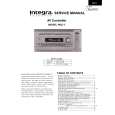
INTEGRA RDC7
Manual de Usuario


¡Twitee acerca de este producto y obtenga $1.00 de crédito en la tienda para uso!
  • Descargable
  • Formato PDF
  • Manual completo
  • Idiomas: English
Precio: $4.99

Descripción del INTEGRA RDC7 Manual de Usuario

Manual del propietario completo en formato digital. El manual estará disponible para descarga como archivo PDF después de que lo compre.

El Manual del Propietario (a veces llamado Manual del Usuario o Guía del Usuario) contiene información sobre cómo utilizar su dispositivo. Después de colocar la orden le enviaremos las instrucciones de descarga a su dirección de e-mail.

The manual is available in languages: English

Not yet ready
You must purchase it first

Opiniones de los clientes
No hay comentarios de productos.

TEXT_PDF_SNIPPET
Enjoying music or videos with the RDC-7
Using the many features of the RDC-7
Outputting from different input source: You can have the RDC-7 output the audio of one input source through the speakers while the video of another input source is output to the monitor (see �2-3. Video Setup sub-menu� on page 38). Assigning names to input sources: You can enter a name for each input source so that when the source is selected the name of that source is displayed in the front display of the RDC-7 (see �2-7. Character Input sub-menu� on page 43). Temporarily changing the speaker output levels: To change the individual speaker volumes temporarily, use the remote controller and follow the procedure given below. Note that the calibration settings will return to the original settings when the RDC-7 is put in standby. 1. Press the CH SEL button and select the desired speaker. 2. Press the LEVEL + or � button to adjust the volume level. Using the sleep time: To set the sleep timer, press the SLEEP button on the remote controller and then set the time that you want the RDC-7 to enter the standby state (see page 60). Temporarily turning off the sound: To turn off the sound momentarily, such as when interrupted by a phone call, press the MUTING button on the remote controller (see page 61). Adjusting the bass and treble: You can adjust the bass and treble levels at the Sound Effect sub-menu of the OSD menu: Input Setup � Sound Effect (see page 42). Adjusting the brightness of the front display: You can adjust the brightness of the front display of the RDC-7 with DIMMER button on the remote controller or on the RDC-7 front panel (see page 61).

Enjoying the multichannel output
Before you can use a component with multichannel output, you must first select �Yes� for the Multichannel setting in the OSD menu for that input source: Input Setup � Multichannel Setup (see page 38).

1. Press the input source button for the component with multichannel output connected to the MULTI CHANNEL INPUT on the rear of the RDC-7. 2. Turn on the connected component and start playing the desired media. 3. If necessary, press the CH SEL button on the remote controller to select an individual speaker. Then press the LEVEL + or � button to adjust the output level as desired.
Adjust the speaker output levels so that you can hear the same sound level from each speaker at the listening position. For the front right, front left, center, surround right,surround left, surround back right and surround back left speakers, the output levels can be adjusted between �12 to +12 decibels. The subwoofer can be adjusted between �30 and +10 decibels.

4. Adjust the volume with the MASTER VOLUME dial or the VOL controller. buttons on the remote

If one of the messages shown below appears
If one of the messages shown below appears in the front display, it is telling you that the operation you are trying to perform is not possible for the reason given in the message.

The operation is not allowed because headphones are plugged into the RDC-7.

The operation is not allowed because the selected input source is set for multichannel input.

The operation is not allowed by the current speaker configuration.

No setting other than Dolby Digital can be set.

57

Quizás también quiera comprar

$4.99

RDC7 INTEGRA
Manual de Servicio

Manual de servicio completo en formato digital (archivo PDF). Los manuales de servicio por lo genera…
>
Parse Time: 0.337 - Number of Queries: 277 - Query Time: 0.111