ADG 7680 Quantity: 1
$4.99
» View Details
RB770PXYB4 Quantity: 1
$4.99
» View Details
RMT-V174 Quantity: 1
$4.99
» View Details
1CWTW5300SQ0 Quantity: 1
$4.99
» View Details
TES325MQ2 Quantity: 1
$4.99
» View Details
SV 2514 Quantity: 1
$4.99
» View Details
GKA 2511 Quantity: 1
$4.99
» View Details
CT5398/ATXSAVCZ Quantity: 1
$4.99
» View Details
ET20DKXTG10 Quantity: 1
$4.99
» View Details
WORKINGMANS 10 Quantity: 1
$4.99
» View Details
CO450 Quantity: 1
$4.99
» View Details
GJC3054RS01 Quantity: 1
$4.99
» View Details
CS505 Quantity: 1
$4.99
» View Details
KSSS42FJB00 Quantity: 1
$4.99
» View Details
AWE 9727 Quantity: 1
$4.99
» View Details
AWM 6145/3 Quantity: 1
$4.99
» View Details
XV-HTD5/DDRXJ/RD Quantity: 1
$4.99
» View Details
OBI137W Quantity: 1
$4.99
» View Details
CT3508/ABTSA0TR Quantity: 1
$4.99
» View Details
ZBN731N/1 Quantity: 1
$4.99
» View Details
RT16DKYXL00 Quantity: 1
$4.99
» View Details
SR-JV80-10 Quantity: 1
$4.99
» View Details
D40A2 Quantity: 1
$4.99
» View Details
D8714/00 Quantity: 1
$4.99
» View Details
KV-AR292N60 Quantity: 1
$4.99
» View Details
ET8WWKXKQ03 Quantity: 1
$4.99
» View Details
WBE34332 A++DFCWF Quantity: 1
$4.99
» View Details
20A2 Quantity: 1
$4.99
» View Details
JSI6467-E Quantity: 1
$4.99
» View Details
CCD-TR42 Quantity: 1
$4.99
» View Details
AKP 444/IX Quantity: 1
$4.99
» View Details
SPKKS44 Quantity: 1
$4.99
» View Details
200P3G/74C Quantity: 1
$4.99
» View Details
GR-DF420EZ Quantity: 1
$4.99
» View Details
KUDW02FRSS0 Quantity: 1
$4.99
» View Details
ARC 1390/BR Quantity: 1
$4.99
» View Details
NNS752 Quantity: 1
$4.99
» View Details
CR9000 Quantity: 1
$4.99
» View Details
LE6880XTF0 Quantity: 1
$4.99
» View Details
AJ3600/00 Quantity: 1
$4.99
» View Details
ICF510 Quantity: 1
$4.99
» View Details
ZQ-1050 Quantity: 1
$4.99
» View Details
FEP350YW1 Quantity: 1
$4.99
» View Details
PC-7 Quantity: 1
$4.99
» View Details
KRC-777R Quantity: 1
$4.99
» View Details
LCB-177.1 I Quantity: 1
$4.99
» View Details
ED5FHAXSB01 Quantity: 1
$4.99
» View Details
YKERC501AW1 Quantity: 1
$4.99
» View Details
Subtotal: $239.52
 
English Polski Spanish 
Buscar un manual
 

(p.Ej. AA-V20EG JVC, ZX-7 Sony)
PayPal 1000+ rating Secure, Encrypted Checkout.
 
Productos
Información
Destacado
Inicio >> PANASONIC >> TH50PX50U Manual de Usuario
 
 48 artículo(s) en Su carrito 

PANASONIC TH50PX50U
Manual de Usuario


¡Twitee acerca de este producto y obtenga $1.00 de crédito en la tienda para uso!
  • Descargable
  • Formato PDF
  • Manual completo
  • Idiomas: English, Spanish
Precio: $4.99

Descripción del PANASONIC TH50PX50U Manual de Usuario

Manual del propietario completo en formato digital. El manual estará disponible para descarga como archivo PDF después de que lo compre.

El Manual del Propietario (a veces llamado Manual del Usuario o Guía del Usuario) contiene información sobre cómo utilizar su dispositivo. Después de colocar la orden le enviaremos las instrucciones de descarga a su dirección de e-mail.

The manual is available in languages: English, Spanish

Not yet ready
You must purchase it first

Opiniones de los clientes
No hay comentarios de productos.

TEXT_PDF_SNIPPET
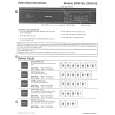
Operating peripheral equipment
Programming the remote control code
You can operate other manufacturers� components using this TV�s remote control. Preparations: � Connect the power cord of the external component to the wall outlet. � Make sure the component is turned off.
C A
CH

1
POWER

+

POWER

- VOL

OK CH

VOL+

Press and hold POWER and OK together, for at least 5 seconds. � The mode selection buttons flashes, and then release POWER and OK.

SAP

LIGHT

TV DTV
TV/VIDEO

VCR RCVR

DVD DBS/CBL
SLEEP

AUX
EXIT

2
DTV

VCR RCVR

DVD DBS/CBL AUX

Select the type of the component. � The selected button lights and all others go out.

PECT AS

FAVORITE

E
M UT
CH

RE

LL

- VOL
MENU

OK

VOL+

3
RETURN

1 4

2 5 8 0

3 6 9

Enter the 3-digit infrared code (see pages 40-42). � Factory default setting : Panasonic � Press POWER to test the operation.

CH

7

1 4 7
R-TUNE

2 5 8 0

3 6 9
PROG

Notes: � If the component does not operate with the remote control, repeat the procedure using another code. (Some brands have multiple codes.) � If an incorrect code is entered, or if the procedure takes longer than 30 seconds, the programming will fail.

REW

PLAY

FF

To find a code not listed in the index

PAUSE

STOP

REC

1

After selecting the type of component (step 2, above)
CH

TV/VCR

DVD/VCR CH

OPEN/CLOSE
- VOL

OK CH

VOL+

Press to select the code. � The code starts from the current device. � Press POWER button to test the operation. � Repeat the steps until the component code is found. It may take many attempts before the correct code is found. Press to store the code.

TV

2
- VOL

CH

OK

VOL+

CH

39

Quizás también quiera comprar

$4.99

TH-50PX50U PANASONIC
Manual de Servicio

Manual de servicio completo en formato digital (archivo PDF). Los manuales de servicio por lo genera…
>
Parse Time: 0.891 - Number of Queries: 269 - Query Time: 0.474