|
|
|
Productos
|
|
Información
|
|
Destacado
|
|
|
 |
|
|
No hay comentarios de productos.
Safety precautions
2WARNING
To prevent injury and/or fire, take the following precautions:
� Insert the unit all the way until it is fully locked in place. Otherwise it may fly out of place during collisions and other jolts. � When extending the ignition, battery or ground cables, make sure to use automotivegrade cables or other cables with an area of 0.75mm2 (AWG18) or more to prevent cable deterioration and damage to the cable coating. To prevent short circuits, never put or leave any metallic objects (e.g., coins or metal tools) inside the unit. If the unit starts to emit smoke or strange smells, turn off the power immediately and consult your Kenwood dealer. Be careful not to drop the unit or subject it to strong shock. The unit may break or crack because it contains glass parts. Do not touch the liquid crystal fluid if the LCD is damaged or broken due to shock. The liquid crystal fluid may be dangerous to your health or even fatal. If the liquid crystal fluid from the LCD contacts your body or clothing, wash it off with soap immediately.
2CAUTION
To prevent damage to the machine, take the following precautions:
� Make sure to ground the unit to a negative 12V DC power supply. � Do not open the top or bottom covers of the unit. � Do not install the unit in a spot exposed to direct sunlight or excessive heat or humidity. Also avoid places with too much dust or the possibility of water splashing. � Do not set the removed faceplate or the faceplate case in areas exposed to direct sunlight, excessive heat or humidity. Also avoid places with too much dust or the possibility of water splashing. � Do not subject the faceplate to excessive shock, as it is a piece of precision equipment. � To prevent deterioration, do not touch the terminals of the unit or faceplate with your fingers. � When replacing a fuse, only use a new one with the prescribed rating. Using a fuse with the wrong rating may cause your unit to malfunction. � To prevent short circuits when replacing a fuse, first disconnect the wiring harness. � During installation, do not use any screws except for the ones provided. The use of improper screws might result in damage to the main unit.
NOTE
� If you experience problems during installation, consult your Kenwood dealer. � If the unit does not seem to be working right, try pressing the reset button first. If that does not solve the problem, consult your Kenwood dealer.
MONO
AUTO AME
CLK
LOUD
� �
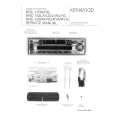
Reset button Cleaning the Unit
If the front panel gets dirty, turn off the power and wipe the panel with a dry silicon cloth or soft cloth.
�
�
2CAUTION
Do not wipe the panel with a stiff cloth or a cloth dampened by volatile solvents such as paint thinner and alcohol. They can scratch the surface of the panel and/or cause the indicator letters to peel off.
Cleaning the Faceplate Terminals
If the terminals on the unit or faceplate get dirty, wipe them with a dry, soft cloth.
�3�
|
|
|
> |
|