42KT4184 Quantity: 1
$4.99
» View Details
FLS521C Quantity: 1
$4.99
» View Details
KD-AV7010J Quantity: 1
$4.99
» View Details
ED25DQXVF01 Quantity: 1
$4.99
» View Details
P3540PD Quantity: 1
$4.99
» View Details
ZFC50/2 Quantity: 1
$4.99
» View Details
AR-FX7 Quantity: 1
$4.99
» View Details
DP 4220 Quantity: 1
$4.99
» View Details
VSX-D714-S/YPWXJI Quantity: 1
$4.99
» View Details
GU2400XTPS7 Quantity: 1
$4.99
» View Details
TF551 Quantity: 1
$4.99
» View Details
ET8CHKXKT02 Quantity: 1
$4.99
» View Details
HB3000P/2 Quantity: 1
$4.99
» View Details
EWF14460 Quantity: 1
$4.99
» View Details
SR4320 Quantity: 1
$4.99
» View Details
JUG94880 Quantity: 1
$4.99
» View Details
MP34 DRESDEN Quantity: 1
$4.99
» View Details
T3 Quantity: 1
$4.99
» View Details
3724UKC Quantity: 1
$4.99
» View Details
HR-V500EZ Quantity: 1
$4.99
» View Details
AWZ 512 E Quantity: 1
$4.99
» View Details
DGM22D1DI Quantity: 1
$4.99
» View Details
MC096CD Quantity: 1
$4.99
» View Details
KPES48ME1 Quantity: 1
$4.99
» View Details
KUCS03FTSS0 Quantity: 1
$4.99
» View Details
KTRS22ELSS02 Quantity: 1
$4.99
» View Details
KUDC02IRWH1 Quantity: 1
$4.99
» View Details
BR-S920E Quantity: 1
$4.99
» View Details
KVI 1309/A-LH Quantity: 1
$4.99
» View Details
FAVCOMP.325ID Quantity: 1
$4.99
» View Details
KRI 1509 A+ LH Quantity: 1
$4.99
» View Details
WM-FX453 Quantity: 1
$4.99
» View Details
KTRC22ELWH01 Quantity: 1
$4.99
» View Details
DMC-FS5P VOLUME 1 Quantity: 1
$4.99
» View Details
AKZ493/IX Quantity: 1
$4.99
» View Details
KV27TW75 Quantity: 1
$4.99
» View Details
GSF3130S Quantity: 1
$4.99
» View Details
IK153-2Z Quantity: 1
$4.99
» View Details
AKZ 175 WH Quantity: 1
$4.99
» View Details
HD4652/22 Quantity: 1
$4.99
» View Details
KV21C4B Quantity: 1
$4.99
» View Details
FG10N Quantity: 1
$4.99
» View Details
XL-PM11C Quantity: 1
$4.99
» View Details
DVDR3320V05 Quantity: 1
$4.99
» View Details
HA-610 Quantity: 1
$4.99
» View Details
SCS3614GQ2 Quantity: 1
$4.99
» View Details
KV-1976R Quantity: 1
$4.99
» View Details
HP1540 Quantity: 1
$4.99
» View Details
150B5CG/27B Quantity: 1
$4.99
» View Details
HR-S7722EU Quantity: 1
$4.99
» View Details
HRJ7020UA Quantity: 1
$4.99
» View Details
FL 1008 Quantity: 1
$4.99
» View Details
TAF117R Quantity: 1
$4.99
» View Details
KSSS36MDX05 Quantity: 1
$4.99
» View Details
AWO 5831 Quantity: 1
$4.99
» View Details
29PT5124/16R Quantity: 1
$4.99
» View Details
CCDTRV107E Quantity: 1
$4.99
» View Details
SX2908 Quantity: 1
$4.99
» View Details
GD5RHAXSL01 Quantity: 1
$4.99
» View Details
VR342 Quantity: 1
$4.99
» View Details
GSQ9611KT0 Quantity: 1
$4.99
» View Details
AWZ 460 WP Quantity: 1
$4.99
» View Details
GSF 870 TW-WS Quantity: 1
$4.99
» View Details
N24 Quantity: 1
$4.99
» View Details
ZKT625LBV 66C Quantity: 1
$4.99
» View Details
ST70255IDTV/LOG Quantity: 1
$4.99
» View Details
SC528DXL ANALOGUE Quantity: 1
$4.99
» View Details
KV1882HK Quantity: 1
$4.99
» View Details
ARZ 854/H Quantity: 1
$4.99
» View Details
DNHI 3660 IN Quantity: 1
$4.99
» View Details
SLPG5E/EB/EG Quantity: 1
$4.99
» View Details
Subtotal: $354.29
 
English Polski Spanish 
Buscar un manual
 

(p.Ej. AA-V20EG JVC, ZX-7 Sony)
PayPal 1000+ rating Secure, Encrypted Checkout.
 
Productos
Información
Destacado
Inicio >> SONY >> PLMA35 Manual de Servicio
 
 71 artículo(s) en Su carrito 

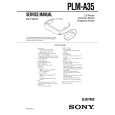
SONY PLMA35
Manual de Servicio


¡Twitee acerca de este producto y obtenga $1.00 de crédito en la tienda para uso!
  • Contiene diagramas del circuito
  • Descargable
  • Formato PDF
  • Manual completo
  • Idiomas: English
Precio: $4.99

Descripción del SONY PLMA35 Manual de Servicio

Manual de servicio completo en formato digital (archivo PDF). Los manuales de servicio por lo general contienen diagramas de circuitos, tarjetas de circuitos impresos, consejos para reparación, diagramas de cableado, diagramas de bloque y lista de refacciones. El Manual de Servicio (a veces llamado Manual de Reparación) es usado principalmente por los técnicos.

Si tan solo quiere saber cómo utilizar su televisión, reproductor de vídeo, reproductor de mp3, etc. Quizá lo que necesita es el Manual del Propietario. Después de colocar la orden le enviaremos las instrucciones de descarga a su dirección de e-mail.

The manual is available in languages: English

Not yet ready
You must purchase it first

Opiniones de los clientes
No hay comentarios de productos.

TEXT_PDF_SNIPPET
Using the Glasstron (continued)

2

If the screens are aligned, press the START/BATT CHECK button.
Left screen Right screen

3 4

Start playback on the video equipment connected to the Glasstron. Adjust the volume by turning the VOL control.
When you set the AVLS ON/OFF switch to ON, you cannot turn up the volume beyond the defined limit (see page 24).

Correct The combined picture you see with both eyes

You may see a horizontal line on the left screen rather than the right screen and vertical lines on the right screen rather than the left screen. This is not a malfunction.

If the image you see matches one of the pictures below, you have correct screen alignment. Correct Correct Correct Correct lower

VOL

louder

Operations Operations

5
START/BATT CHECK

Check that the four corners of the screen are clear.
If the four corners of the screen are not clear, do the step 2 (page 22) to check the screen position alignment again.

6
If the image you see matches one of the pictures below, stop using the Glasstron immediately. Use of the Glasstron under such conditions may cause eye fatigue or eye damage.
Incorrect Incorrect Incorrect

Adjust the brightness by turning the BRIGHT control.

BRIGHT
�| �{

less bright

brighter

When no vertical lines cross the horizontal line.

When the horizontal line appears as a diagonal line.

When the center vertical line does not cross the horizontal line.

If you cannot see a proper arrangement of these lines even after resting your eyes for a few hours, the Glasstron may not be operating correctly. Contact your Sony dealer or local authorized Sony service facility.
continued

22-US

23-US

Using the Glasstron (continued)

Setting the user lock
Screen warnings against overuse of the Glasstron
To prevent eye fatigue or eye damage, after you use the Glasstron for three hours the following caution appears on the screen and the power turns off automatically.

After you finish using the Glasstron
Take off the Glasstron, and turn off the power. Note on the LCDs
The LCD screen is made with highprecision technology. However, black points or bright points of light (red, blue, or green) may appear constantly on the LCD screen. This is not malfunction. (Effective dots: more than 99.99%)

WARNING
This product should not be used by children age 15 or younger. The eyes of children are still developing and may be adversely affected by use of this product. To prevent such use, this product is equipped with the user lock system. When the user lock is on, audio and video signals are not input and all operations except power on/off are disabled. To use the Glasstron, unlock the user lock.

TIME OUT

Set the user lock switch as shown in the illustration.

1
TEMPS DEPASS USER LOCK

Preventing sound from escaping through the stereo headphones �� AVLS(Auto Volume Limiter System):
Keeps down the maximum volume to protect your ear. You cannot turn up the volume beyond the defined limit even if you try to turn it up.

Caution: Motion sickness from viewing programs.

VERR. UTILIS

Set the AVLS ON/OFF switch to ON.

Some viewers may experience motion sickness, headache or nausea from viewing movies or video programs, especially those with intense action and movement. If you feel any of these symptoms, stop using the product immediately. To avoid personal injury or injury to others, do not drive a car or motorcycle, nor do anything that requires concentration until the symptoms disappear.

Bottom of the Power supply box

Lock

Unlock

To unlock the user lock
Set the user lock switch to the opposite position.

Caution: Motion sickness from external motion.
Do not use the product while subject to external motion �� for example, as a passenger in a car. Use of this product under these conditions may cause motion sickness.

A VLS OFF ON

To turn the AVLS off
Set the AVLS ON/OFF switch to OFF.

24-US

25-US

1-4

Quizás también quiera comprar

$4.99

PLMA35 SONY
Manual de Usuario

Manual del propietario completo en formato digital. El manual estará disponible para descarga como …
>
Parse Time: 0.91 - Number of Queries: 355 - Query Time: 0.438