DVDR5350H/05 Quantity: 1
$4.99
» View Details
MCE4001 Quantity: 1
$4.99
» View Details
3XWGD5705SW0 Quantity: 1
$4.99
» View Details
856048512000 Quantity: 1
$4.99
» View Details
MDE2400AYW Quantity: 1
$4.99
» View Details
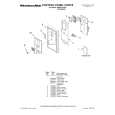
KHMS1850SSS0 Quantity: 1
$4.99
» View Details
SiE305GR Quantity: 1
$4.99
» View Details
FCV723W-2 Quantity: 1
$4.99
» View Details
GD-19L1G Quantity: 1
$4.99
» View Details
TA3200F Quantity: 1
$4.99
» View Details
TCW300 Quantity: 1
$4.99
» View Details
PVM14N5U Quantity: 1
$4.99
» View Details
DVR-212D Quantity: 1
$4.99
» View Details
ZTE220 Quantity: 1
$4.99
» View Details
AWM ECO 1200 Quantity: 1
$4.99
» View Details
Z99 Quantity: 1
$4.99
» View Details
VR233400F Quantity: 1
$4.99
» View Details
RB184RLDA Quantity: 1
$4.99
» View Details
80SC Quantity: 1
$4.99
» View Details
VSX-D458-HT/KUXJI Quantity: 1
$4.99
» View Details
SLV-741HF Quantity: 1
$4.99
» View Details
ZDI 6543 N Quantity: 1
$4.99
» View Details
GST9679PB0 Quantity: 1
$4.99
» View Details
HRDD888EU Quantity: 1
$4.99
» View Details
XV-EV9/MTXJ Quantity: 1
$4.99
» View Details
VR5500FR Quantity: 1
$4.99
» View Details
YCEM2760KQ3 Quantity: 1
$4.99
» View Details
VHM665-1 Quantity: 1
$4.99
» View Details
KX-TMC40HGW Quantity: 1
$4.99
» View Details
XRBR904BB Quantity: 1
$4.99
» View Details
AWM 8500-GB Quantity: 1
$4.99
» View Details
KM3465LP Quantity: 1
$4.99
» View Details
MDRCD2000 Quantity: 1
$4.99
» View Details
MC22MPT2 Quantity: 1
$4.99
» View Details
CRDS800YZ1/YH1 Quantity: 1
$4.99
» View Details
VS310 Quantity: 1
$4.99
» View Details
AEF3430N Quantity: 1
$4.99
» View Details
XAMC891MQ2 Quantity: 1
$4.99
» View Details
GGQ8858EQ0 Quantity: 1
$4.99
» View Details
LAV41159 Quantity: 1
$4.99
» View Details
stylewriter ii Quantity: 1
$4.99
» View Details
DV-SP303E Quantity: 1
$4.99
» View Details
YCEM2760KQ2 Quantity: 1
$4.99
» View Details
KHMS147KSS1 Quantity: 1
$4.99
» View Details
YET17JKXJW00 Quantity: 1
$4.99
» View Details
GGW9250PW2 Quantity: 1
$4.99
» View Details
CORUM-72TK86 Quantity: 1
$4.99
» View Details
GGQ9800LW1 Quantity: 1
$4.99
» View Details
AWO 1400 EX/1 Quantity: 1
$4.99
» View Details
Pure 2476 Quantity: 1
$4.99
» View Details
CR-D500YZ1 Quantity: 1
$4.99
» View Details
QSG6100W Quantity: 1
$4.99
» View Details
YET14JKXJW00 Quantity: 1
$4.99
» View Details
ARC 0680 Quantity: 1
$4.99
» View Details
GGW9200LT2 Quantity: 1
$4.99
» View Details
AWO 12763 Quantity: 1
$4.99
» View Details
AWO 1200 Quantity: 1
$4.99
» View Details
AWO 2261 Quantity: 1
$4.99
» View Details
STD-1410 Quantity: 1
$4.99
» View Details
Subtotal: $294.41
 
English Polski Spanish 
Buscar un manual
 

(p.Ej. AA-V20EG JVC, ZX-7 Sony)
PayPal 1000+ rating Secure, Encrypted Checkout.
 
Productos
Información
Destacado
Inicio >> WHIRLPOOL >> KHMS155LBT0 Manual de Usuario
 
 59 artículo(s) en Su carrito 

WHIRLPOOL KHMS155LBT0
Manual de Usuario


¡Twitee acerca de este producto y obtenga $1.00 de crédito en la tienda para uso!
  • Descargable
  • Formato PDF
  • Manual completo
  • Idiomas: English
Precio: $4.99

Descripción del WHIRLPOOL KHMS155LBT0 Manual de Usuario

Manual del propietario completo en formato digital. El manual estará disponible para descarga como archivo PDF después de que lo compre.

El Manual del Propietario (a veces llamado Manual del Usuario o Guía del Usuario) contiene información sobre cómo utilizar su dispositivo. Después de colocar la orden le enviaremos las instrucciones de descarga a su dirección de e-mail.

The manual is available in languages: English

Not yet ready
You must purchase it first

Opiniones de los clientes
No hay comentarios de productos.

TEXT_PDF_SNIPPET
Tones
Tones are audible signals, indicating the following:

Child Lock
The Child Lock shuts down the control panel pads to prevent unintended use of the microwave oven. When the control is locked, only the Vent Fan and Light pads will function. To Lock/Unlock Control: The microwave oven and Timer must be off. Touch and hold START for 5 seconds until 2 tones sound and a lock icon appears on the display. Repeat to unlock and remove the lock icon from display.

One tone
� �

Valid entry (short tone) End of Timer countdown (long tone) Reminder, repeat each minute after the end-of-cycle tones End of stage in multistage cooking Turn food during defrost cycle (short tones) Hidden feature has been entered or exited

Two tones
� � � �

Vent Fan
The vent fan has speeds ranging from 1 (LOW) to 5 (HIGH). The first time the Vent Fan is turned on after power is supplied to the microwave oven, it will start at speed level 1. Each time the fan is turned on, it will start at the speed level that was used last. To protect the microwave oven, the vent fan will automatically turn on at the HIGH setting if the temperature from the range or cooktop below gets too hot. It may stay on for up to one hour to cool the microwave oven. When this occurs, the VENT FAN pads will not function.

Three tones
�

Invalid entry

Four tones
�

End of cycle

To Turn Off/On Valid Entry Tones: Touch and hold the number pad 1 for 5 seconds until 2 tones sound. Repeat to turn tones back on. To Turn Off/On All Tones: Touch and hold the number pad 2 for 5 seconds until 2 tones sound. Repeat to turn tones back on.

To Turn Vent Fan On/Off:
1. Touch VENT FAN ON-OFF pad. 2. Touch HIGHER or LOWER pad to increase or decrease the fan speed. The display will show �FAN� and a number between 1 and 5 to indicate fan speed. After 2 seconds, the display returns to previous display.

Timer
The Timer can be set in minutes and seconds, up to 99 minutes 99 seconds and counts down the set time. NOTE: The Timer does not start or stop the microwave oven. When the Timer is in use, the microwave oven can still operate. To see the time countdown for 5 seconds while the microwave oven is in use, touch TIMER.

Cooktop Light
The cooktop light has 3 settings: on, night and off. To Turn On/Night/Off: Touch LIGHT ON-NIGHT-OFF repeatedly to cycle through settings.

To Set:
1. Touch TIMER. If no action is taken after 1 minute, the display will return to the time of day mode. 2. Touch the number pads to set the length of time. 3. Touch START. If not touched within 5 seconds, �START?� will appear on the display. If not touched within 1 minute, the display will return to the time of day. When the set time ends, �END� will appear on the display and 1 long tone will sound. 4. Touch TIMER or CANCEL anytime to cancel the Timer. If using the Timer during a cooking function, do not touch CANCEL to cancel Timer, as the cooking function will also cancel. The time can be reset during the countdown by repeating the above steps.

Demo Mode
The Demo Mode is ideal for learning how to use the microwave oven. When set, functions can be entered without actually turning on the magnetron. The microwave oven light will come on, the fan will run and, if on, the turntable will rotate. To Turn On/Off: The microwave oven and Timer must be off. Touch and hold TIMER for 5 seconds until 2 tones sound and �d� appears on the display. Repeat to turn off and remove �d� from the display.

8

Quizás también quiera comprar


¡Es gratis!

KHMS155LBT0 WHIRLPOOL
Manual de Instalación

Complete installation manual in digital format. The manual will be available for download as PDF fil…

$4.99

KHMS155LBT0 WHIRLPOOL
Catálogo de piezas

Únicamente Catálogo de Partes. Está disponible en formato PDF. Muy útil si su equipo se ha averi…
>
Parse Time: 0.412 - Number of Queries: 313 - Query Time: 0.15