VF37CPKS Quantity: 1
$4.99
» View Details
SD5700 Quantity: 1
$4.99
» View Details
RC24LN-3AW Quantity: 1
$4.99
» View Details
CA1713 Quantity: 1
$4.99
» View Details
CLD-V2600 Quantity: 1
$4.99
» View Details
SADM3EE Quantity: 1
$4.99
» View Details
ETK 4240/IN CH Quantity: 1
$4.99
» View Details
DECT5150L/00 Quantity: 1
$4.99
» View Details
CPWNA001/00 Quantity: 1
$4.99
» View Details
ICKITW2 Quantity: 1
$4.99
» View Details
PADKONTROL Quantity: 1
$4.99
» View Details
YKEBS208DB4 Quantity: 1
$4.99
» View Details
PG 51 Quantity: 1
$4.99
» View Details
VXL8 Quantity: 1
$4.99
» View Details
VR21060 Quantity: 1
$4.99
» View Details
FS-MD9000J Quantity: 1
$4.99
» View Details
DOCUCOLOR1632 Quantity: 1
$4.99
» View Details
FTS - M163 Quantity: 1
$4.99
» View Details
RF368LXPQ1 Quantity: 1
$4.99
» View Details
SE5106HIFI Quantity: 1
$4.99
» View Details
AV32WFRlEKS Quantity: 1
$4.99
» View Details
ED22DSXDB02 Quantity: 1
$4.99
» View Details
7368 Quantity: 1
$4.99
» View Details
54374450 Quantity: 1
$4.99
» View Details
KX-T7550 Quantity: 1
$4.99
» View Details
JC1G.. Quantity: 1
$4.99
» View Details
PCG-FR495EP VAIO Quantity: 1
$4.99
» View Details
ADG 8557/2 IX Quantity: 1
$4.99
» View Details
KRC-265 Quantity: 1
$4.99
» View Details
ESN5960/BR Quantity: 1
$4.99
» View Details
CM-S330 Quantity: 1
$4.99
» View Details
G5300 Quantity: 1
$4.99
» View Details
KEH-P1010R/XM/EW Quantity: 1
$4.99
» View Details
WA 4540-D Quantity: 1
$4.99
» View Details
1433 Quantity: 1
$4.99
» View Details
TYPE 891X Quantity: 1
$4.99
» View Details
KSRG25FTWH02 Quantity: 1
$4.99
» View Details
52865 Quantity: 1
$4.99
» View Details
AV-29MT36Z Quantity: 1
$4.99
» View Details
KGEE 3439/A-LH Quantity: 1
$4.99
» View Details
L 524 Quantity: 1
$4.99
» View Details
RC-EX10BSE Quantity: 1
$4.99
» View Details
CFD-767 Quantity: 1
$4.99
» View Details
GBC4600 CHASSIS Quantity: 1
$4.99
» View Details
RS-5 Quantity: 1
$4.99
» View Details
SUPER C 2855B EURO Quantity: 1
$4.99
» View Details
FEP210VW6 Quantity: 1
$4.99
» View Details
RDM15 Quantity: 1
$4.99
» View Details
AWZ 412/D Quantity: 1
$4.99
» View Details
V-732EF Quantity: 1
$4.99
» View Details
Subtotal: $249.50
 
English Polski Spanish 
Buscar un manual
 

(p.Ej. AA-V20EG JVC, ZX-7 Sony)
PayPal 1000+ rating Secure, Encrypted Checkout.
 
Productos
Información
Destacado
Inicio >> JVC >> DZVCA1SE Manual de Servicio
 
 50 artículo(s) en Su carrito 

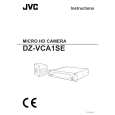
JVC DZVCA1SE
Manual de Servicio


¡Twitee acerca de este producto y obtenga $1.00 de crédito en la tienda para uso!
  • Contiene diagramas del circuito
  • Descargable
  • Formato PDF
  • Manual completo
  • Idiomas: English
Precio: $4.99

Descripción del JVC DZVCA1SE Manual de Servicio

Manual de servicio completo en formato digital (archivo PDF). Los manuales de servicio por lo general contienen diagramas de circuitos, tarjetas de circuitos impresos, consejos para reparación, diagramas de cableado, diagramas de bloque y lista de refacciones. El Manual de Servicio (a veces llamado Manual de Reparación) es usado principalmente por los técnicos.

Si tan solo quiere saber cómo utilizar su televisión, reproductor de vídeo, reproductor de mp3, etc. Quizá lo que necesita es el Manual del Propietario. Después de colocar la orden le enviaremos las instrucciones de descarga a su dirección de e-mail.

The manual is available in languages:

Not yet ready
You must purchase it first

Opiniones de los clientes
No hay comentarios de productos.

TEXT_PDF_SNIPPET
� � PRESET W.B. 3200K � �SAVE W.B. NAME 1 NAME 2 NAME 3 M. RESET RETURN

(3) When a user�s original white balance (1, 2 or 3) is selected, enter the name of the white balance. (Select the number following the name corresponding to the number of the user�s original white balance.) 1 Characters selective for input are �A to Z�, �0 to 9�, �.�, �:�, �-�, �/� and space. 2 For inputting a name, select the preset name with the UP or DOWN key of the MENU and then press the RIGHT key to enter the MENU into the character input mode. 3 Select characters with the UP and DOWN keys of the MENU in the character input mode. Use the RIGHT and LEFT keys to move the cursor. 4 To quit the character input mode, move the cursor to the preset name selection mode with the RIGHT or LEFT key. Example: When �USER 1� is entered as the name of the user�s original white balance �1� (NAME 1), the indication of the SERVICE MENU is as shown below.

PRESET W.B. 1 SAVE W.B. � NAME 1 � USER 1 � NAME 2 NAME 3 M. RESET RETURN � UP � DOWN

(4) Set a white balance automatically or manually. 1 For setting a white balance manually, use the R/B VR on the front panel. 2 For setting a white balance automatically, continue to press the SET button until the �AUTO WHITE OK� message appears on the display while shooting a white chart with the lens set in the defocus status under the specified lighting condition (specified color temperature and illuminance). (5) Save the setting of the white balance in the memory. 1 Move the cursor to �SAVE W.B.� with the UP or DOWN key of the MENU, and then press the RIGHT key.

� PRESET W.B. 3200K � SAVE W.B. � EXECUTE � NAME 1 NAME 2 NAME 3 M. RESET RETURN � OK � CANCEL

2 To save the setting of the white balance in the memory, select �OK� with the DOWN key. To cancel this saving operation, select �CANCEL� with the UP key.

2-20

Quizás también quiera comprar

$4.99

DZ-VCA1SE JVC
Manual de Usuario

Manual del propietario completo en formato digital. El manual estará disponible para descarga como …
>
Parse Time: 1.135 - Number of Queries: 293 - Query Time: 0.726