SD-P1610SE Quantity: 1
$4.99
» View Details
CHASSIS EURO3 Quantity: 1
$4.99
» View Details
FT7174B Quantity: 1
$4.99
» View Details
EX-P600 Quantity: 1
$4.99
» View Details
CE32WN2B-00 Quantity: 1
$4.99
» View Details
ADP7641 Quantity: 1
$4.99
» View Details
MCM276R/37B Quantity: 1
$4.99
» View Details
ADL 335/2 IX Quantity: 1
$4.99
» View Details
7430BEOVISION Quantity: 1
$4.99
» View Details
AV-32F577/Z Quantity: 1
$4.99
» View Details
21D81 Quantity: 1
$4.99
» View Details
CDE-7855R Quantity: 1
$4.99
» View Details
R-25AM Quantity: 1
$4.99
» View Details
1220 Quantity: 1
$4.99
» View Details
5500 BEOMASTER Quantity: 1
$4.99
» View Details
AVT2912/ZAR Quantity: 1
$4.99
» View Details
B261 Quantity: 1
$4.99
» View Details
DCR-TRV410 Quantity: 1
$4.99
» View Details
HS-AP1MK9 Quantity: 1
$4.99
» View Details
TN6500 Quantity: 1
$4.99
» View Details
AWV 508/2 Quantity: 1
$4.99
» View Details
AL-110 Quantity: 1
$4.99
» View Details
ART-940 Quantity: 1
$4.99
» View Details
CDCZ117 Quantity: 1
$4.99
» View Details
P40-540FT Quantity: 1
$4.99
» View Details
AP65R Quantity: 1
$4.99
» View Details
Subtotal: $129.74
 
English Polski Spanish 
Buscar un manual
 

(p.Ej. AA-V20EG JVC, ZX-7 Sony)
PayPal 1000+ rating Secure, Encrypted Checkout.
 
Productos
Información
Destacado
Inicio >> PIONEER >> DVR-231-AV/KUXV/CA Manual de Servicio
 
 26 artículo(s) en Su carrito 

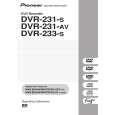
PIONEER DVR-231-AV/KUXV/CA
Manual de Servicio


¡Twitee acerca de este producto y obtenga $1.00 de crédito en la tienda para uso!
  • Contiene diagramas del circuito
  • Descargable
  • Formato PDF
  • Manual completo
  • Idiomas: English
Precio: $4.99

Descripción del PIONEER DVR-231-AV/KUXV/CA Manual de Servicio

Manual de servicio completo en formato digital (archivo PDF). Los manuales de servicio por lo general contienen diagramas de circuitos, tarjetas de circuitos impresos, consejos para reparación, diagramas de cableado, diagramas de bloque y lista de refacciones. El Manual de Servicio (a veces llamado Manual de Reparación) es usado principalmente por los técnicos.

Si tan solo quiere saber cómo utilizar su televisión, reproductor de vídeo, reproductor de mp3, etc. Quizá lo que necesita es el Manual del Propietario. Después de colocar la orden le enviaremos las instrucciones de descarga a su dirección de e-mail.

The manual is available in languages: English

Not yet ready
You must purchase it first

Opiniones de los clientes
No hay comentarios de productos.

TEXT_PDF_SNIPPET
1

2

3

4

2. SERIAL DOWNLOAD
[Purposes]
A

1. When the main board is replaced, the firmware versions for the system control computer, drive, and the TUFL microcomputer do not match, and operations of the unit may be destabilized. In such a case, the versions for the above three must be matched. 2. This method is used when disc downloading fails.

[Tools to be used]
� PC with serial port � RS-232C cross cable � RS-232C I/F jig (GGF1348) � 7P FFC (VDA1681) � Download program (Image Updater) (*) � Firmware (*) This program must be installed in advance.

[Connection]
Connect as follows:

PC
RS-232C cable

RS-232C I/F
7P FFC

This unit

B

[Install Procedures of the Download Program]
1 Expand the compressed data of SLoader zip. 2 The folder of Image Tools is created, and then double-click on Setup. Exe of that file.
C

3 When the selection screen of the driver is appeared, search from C drive as the driver is installed by default for windows 2000/XP.) 4 When the installation is finished, confirm that the Image Updater can select as [start] [Program] [EMMA2RL Turnkey Image Tools] [Image Updater].

[Download Procedures]
1 Connect the 232C I/F jigs above way.
D

2 Connect the FFC cable of the download jig to CN1402 of MAIN ASSY and the power cable to the unit. 3 Turn on the PC and set the communication baud rate of 232C to 115, 200 bps. 4 Initiate the Image Updater by selecting [Start] [Program] [EMMA2RL Turnkey Image Tools]

[Image Updater].

5 When the Image updater is initiated, select the port to the connecting port (COM1, etc). 6 Click [���] of the "Main Board" line on the extream right, and select the download program "DVR_231M.***file".
E

7 After selecting the download program, push the "Start" button. 8 When the status screen is displayed, turn the DVD recorder on. The writing of the firmware begins. (It's takes about 5 minutes for updating the firmware.) 9 After finishing the update, push "OK" button, and then finish the Image Updater by pushing "Stop" button. 0 Unplug the power cable first, and then the FFC cable. (Be sure tp keep this order.)

F

50
1 2

DVR-231-S
3 4

Quizás también quiera comprar

$4.99

DVR-231-AV/KUXV/CA PIONEER
Manual de Usuario

Manual del propietario completo en formato digital. El manual estará disponible para descarga como …

$4.99

DVR-231-AV/KUXV/CA PIONEER
Guía de consulta rápida

La guía de consulta rápida (a veces llamada Guía de Inicio Rápido) contiene la información más…
>
Parse Time: 0.513 - Number of Queries: 206 - Query Time: 0.26