AZ7681/00Z Quantity: 1
$4.99
» View Details
LGR5644JQ2 Quantity: 1
$4.99
» View Details
SILENCE9250 Quantity: 1
$4.99
» View Details
R332 Quantity: 1
$4.99
» View Details
DEH-P5050UB/XU/CN5 Quantity: 1
$4.99
» View Details
SXDE27NPW Quantity: 1
$4.99
» View Details
HR200 Quantity: 1
$4.99
» View Details
ST258210/6NT Quantity: 1
$4.99
» View Details
ADP 905/2 AV Quantity: 1
$4.99
» View Details
JSV6561 Quantity: 1
$4.99
» View Details
SP760V E Quantity: 1
$4.99
» View Details
SE454SV Quantity: 1
$4.99
» View Details
RT20AKXXL01 Quantity: 1
$4.99
» View Details
MF215GT Quantity: 1
$4.99
» View Details
HS-PX557 Quantity: 1
$4.99
» View Details
3XARG493WP01 Quantity: 1
$4.99
» View Details
7GS6SHEXMS03 Quantity: 1
$4.99
» View Details
ADG 934/3 IX Quantity: 1
$4.99
» View Details
KHGH 9010 Quantity: 1
$4.99
» View Details
KVIE 3181/A+ Quantity: 1
$4.99
» View Details
CS-907 Quantity: 1
$4.99
» View Details
Subtotal: $104.79
 
English Polski Spanish 
Buscar un manual
 

(p.Ej. AA-V20EG JVC, ZX-7 Sony)
PayPal 1000+ rating Secure, Encrypted Checkout.
 
Productos
Información
Destacado
Inicio >> PIONEER >> DV-K102/RD/RA Manual de Servicio
 
 21 artículo(s) en Su carrito 

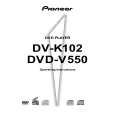
PIONEER DV-K102/RD/RA
Manual de Servicio


¡Twitee acerca de este producto y obtenga $1.00 de crédito en la tienda para uso!
  • Contiene diagramas del circuito
  • Descargable
  • Formato PDF
  • Manual completo
  • Idiomas: English
Precio: $4.99

Descripción del PIONEER DV-K102/RD/RA Manual de Servicio

Manual de servicio completo en formato digital (archivo PDF). Los manuales de servicio por lo general contienen diagramas de circuitos, tarjetas de circuitos impresos, consejos para reparación, diagramas de cableado, diagramas de bloque y lista de refacciones. El Manual de Servicio (a veces llamado Manual de Reparación) es usado principalmente por los técnicos.

Si tan solo quiere saber cómo utilizar su televisión, reproductor de vídeo, reproductor de mp3, etc. Quizá lo que necesita es el Manual del Propietario. Después de colocar la orden le enviaremos las instrucciones de descarga a su dirección de e-mail.

The manual is available in languages: English

Not yet ready
You must purchase it first

Opiniones de los clientes
No hay comentarios de productos.

TEXT_PDF_SNIPPET
DV-K102

REMOTE CONTROL
(Buttons indicated with * are used for menu operation.)

1

LAST MEMORY button
You can resume DVD or Video CD playback from the point you last watched even if the disc is removed from the player. Press LAST MEMORY during playback to set a Last Memory point. When you want to resume playback of that disc, press LAST MEMORY in the stop mode and playback starts from the memorized point. Last Memory locations can be stored for up to 5 DVDs and 1 Video CD.

1
LAST CONDITION MEMORY MEMORY OPEN/ CLOSE SETUP

#
KARAOKE SETUP DISPLAY

2 3 4 5 6 7 8 9 0 = ~ ! @

ENTER

MENU TOP MENU

$ % ^ & * ( ) _ + ¡ �

2 3 4

(standby/on) button
Press to switch the player on or to put in standby.

AUDIO

SUBTITLE

ANGLE

RETURN

KARAOKE SETUP button*

Press to open or close the Karaoke Setup screen.

Cursor buttons (2/3/5/�)*
Use to move through the options on menu screens and to change settings.

STEP/SLOW

SEARCH MODE

1 4 7

2 5 8
REPEAT PLAYBACK CONTROL

3 6 9
A-B

CLEAR

5

ENTER button*
Use to implement settings selected with the cursor buttons or to set items highlighted in a menu.

10 0
PROGRAM

6 £ ¢ � 7

4 (previous)/¢ (next) buttons
During playback, press 4 to go back to a previous chapter/ track and ¢ to advance to the next chapter/track.

VNR

KEY CONTROL

AUDIO button
Press repeatedly to select one of the audio languages and/or audio formats programmed on a DVD. For Video CD and CD in Normal mode, each press changes the audio output as follows. For Super VCD, each press changes the audio output as follows. � Normal mode = Stereo = 1/L (Left) = 2/R (Right) � Karaoke mode 1+= 2 = 1 Stereo = 1L = 1R 2R + 2L + 2 Stereo +

�

8

SUBTITLE button
Press repeatedly to select one of the subtitle languages programmed on a DVD or to turn the subtitles off.

9 0

3 (play) button
Press to start disc playback.

STEP/SLOW e/E buttons
Press STEP/SLOW E during playback to view slow playback. In pause mode, press STEP/SLOW E to advance DVDs and Super VCDs/Video CDs frame by frame and STEP/SLOW e to back up a few frames at a time. Reverse STEP/SLOW is not possible with a Super VCD/Video CD.

66

Quizás también quiera comprar

$4.99

DV-K102/RD/RA PIONEER
Manual de Usuario

Manual del propietario completo en formato digital. El manual estará disponible para descarga como …
>
Parse Time: 0.198 - Number of Queries: 177 - Query Time: 0.054