15GR2330 Quantity: 1
$4.99
» View Details
68101KF-AN95D Quantity: 1
$4.99
» View Details
SRFH2 Quantity: 1
$4.99
» View Details
86SB103 Quantity: 1
$4.99
» View Details
NVFJ616ECY Quantity: 1
$4.99
» View Details
R-5045 Quantity: 1
$4.99
» View Details
EBGL4SNV Quantity: 1
$4.99
» View Details
SSCMX34 Quantity: 1
$4.99
» View Details
ED5FHGXKT00 Quantity: 1
$4.99
» View Details
KGIC 3167-LH Quantity: 1
$4.99
» View Details
28N33B Quantity: 1
$4.99
» View Details
KRC-159RYG Quantity: 1
$4.99
» View Details
HK780 Quantity: 1
$4.99
» View Details
LEV5644AN0 Quantity: 1
$4.99
» View Details
CDP-M47 Quantity: 1
$4.99
» View Details
ARC0942-6I Quantity: 1
$4.99
» View Details
ZS 132/1 Quantity: 1
$4.99
» View Details
PRA-DW11/ZUC Quantity: 1
$4.99
» View Details
RB213TFV Quantity: 1
$4.99
» View Details
KUIS185FWH1 Quantity: 1
$4.99
» View Details
KCM055OB0 Quantity: 1
$4.99
» View Details
NV-R33 Quantity: 1
$4.99
» View Details
4830 Quantity: 1
$4.99
» View Details
BG1200-2A Quantity: 1
$4.99
» View Details
BASSLINK Quantity: 1
$4.99
» View Details
700.346 0/4801 Quantity: 1
$4.99
» View Details
KEBS176WBL1 Quantity: 1
$4.99
» View Details
DU810SWLT0 Quantity: 1
$4.99
» View Details
200 270 65 Quantity: 1
$4.99
» View Details
UX-H100 Quantity: 1
$4.99
» View Details
R-5030 Quantity: 1
$4.99
» View Details
DVDQ40051 Quantity: 1
$4.99
» View Details
IJ70003 Quantity: 1
$4.99
» View Details
AVH-P7500DVD-2/EW Quantity: 1
$4.99
» View Details
KV20FS100 Quantity: 1
$4.99
» View Details
SLVSF99 Quantity: 1
$4.99
» View Details
SR001 Quantity: 1
$4.99
» View Details
2215B Quantity: 1
$4.99
» View Details
GSFS 4451 WS Quantity: 1
$4.99
» View Details
PF-7D Quantity: 1
$4.99
» View Details
NVGS3EG Quantity: 1
$4.99
» View Details
XV-NA70BKJ Quantity: 1
$4.99
» View Details
ZVR11R Quantity: 1
$4.99
» View Details
CTV2610/L Quantity: 1
$4.99
» View Details
AJ3140/10W Quantity: 1
$4.99
» View Details
SVZ122AT Quantity: 1
$4.99
» View Details
7226 Quantity: 1
$4.99
» View Details
DP-C322 Quantity: 1
$4.99
» View Details
LAV267 Quantity: 1
$4.99
» View Details
Subtotal: $244.51
 
English Polski Spanish 
Buscar un manual
 

(p.Ej. AA-V20EG JVC, ZX-7 Sony)
PayPal 1000+ rating Secure, Encrypted Checkout.
 
Productos
Información
Destacado
Inicio >> PIONEER >> DV-C302D/KUXQ/CA Manual de Servicio
 
 49 artículo(s) en Su carrito 

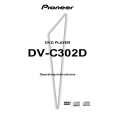
PIONEER DV-C302D/KUXQ/CA
Manual de Servicio


¡Twitee acerca de este producto y obtenga $1.00 de crédito en la tienda para uso!
  • Contiene diagramas del circuito
  • Descargable
  • Formato PDF
  • Manual completo
  • Idiomas: English
Precio: $4.99

Descripción del PIONEER DV-C302D/KUXQ/CA Manual de Servicio

Manual de servicio completo en formato digital (archivo PDF). Los manuales de servicio por lo general contienen diagramas de circuitos, tarjetas de circuitos impresos, consejos para reparación, diagramas de cableado, diagramas de bloque y lista de refacciones. El Manual de Servicio (a veces llamado Manual de Reparación) es usado principalmente por los técnicos.

Si tan solo quiere saber cómo utilizar su televisión, reproductor de vídeo, reproductor de mp3, etc. Quizá lo que necesita es el Manual del Propietario. Después de colocar la orden le enviaremos las instrucciones de descarga a su dirección de e-mail.

The manual is available in languages: English

Not yet ready
You must purchase it first

Opiniones de los clientes
No hay comentarios de productos.

TEXT_PDF_SNIPPET
DV-C302D, DV-K302CD
DV-K302CD

1

2

3

4

5

6

DISC

1
D VD PLA YER

2

3

4

5

6

7

8

9

0

+10

1

2

3

ST ANDBY

KEY CONTROL

OPEN/CLOSE

DISC CHANGE

HIGH

POWER

LOW

OFF

ON

ECHO

MIC 1

MIC 2

MIC 1

MIC 2

5.1CH MODE

ONE-TOUCH KARAOKE

KARAOKE MODE

PLA YBACK CONTROL

�
MIN MAX MIN MAX MIN MAX

7 8 9 0 -

MIC CONTROL

)
1

(

*

&^

%
= ~

$#@!~
8 (pause) button

=

[Models having a STANDBY/ON button on the main unit] STANDBY/ON button
Press to switch the player on or to put in standby.

Press during playback to pause. Press again to resume playback.

7 (stop) button
Press to stop playback. Pressing once enables playback to resume from a point shortly before the location where it stopped. Pressing twice causes the disc to return to the beginning of the disc if playback starts again. Resume play is possible only in Normal mode.

~

[Models having a POWER switch on the main unit] POWER switch
Press to switch the player on or off. When this switch is "ON", the remote control can be used to switch the player between the "ON" state and standby.

! @ # $

PLAYBACK CONTROL button and indicator
Use to switch the playback control for the Super VCD/Video CD on or off.

2

STANDBY indicator
Indicates that the player is in standby, using a minimum amount of power to maintain system settings. Turns off when the player is on. Some models do not have a STANDBY indicator.

KARAOKE MODE button and indicator
Use to switch between Karaoke mode and Normal mode.

ONE-TOUCH KARAOKE button and indicator
Use to switch One-Touch Karaoke mode on or off.

3 4 5 6 7 8 9 0 -

KEY CONTROL buttons
Use to adjust the levels of the key in 11 steps.

5.1 CH MODE button and indicator
Press to switch the audio output between 5.1 channel audio and 2 channel audio. It is also possible to set the default audio output in the Setup screen Audio 2 menu.

Number buttons (1-9, 0, +10)
Use to perform direct title and chapter/track searches, and to input numerical values.

% ^ & * ( )

Display window
Displays system information.

Disc illumination
Lights when a DVD is loaded and when no disc is loaded. Turns off when a disc other than a DVD is played back.

Disc tray
When loading discs, place discs in the disc tray with the label side facing up.

DISC buttons and indicator
Use to select discs in the player directly.

Remote sensor
Point the remote control toward the remote sensor to operate the player.

OPEN/CLOSE 0 button
Press to open and close the disc tray.

DISC CHANGE button
Press to select the next disc in the player.

MIC1, MIC2 and MIC CONTROL jacks
Use to connect a microphone.

4 1 (reverse) button
Press to go back to previous chapters/tracks. Press and hold to perform reverse playback scanning (page 28).

MIC1 and MIC2 volume level knobs
Use to adjust the volume level of the microphone.

Digital Echo level knob
Use to adjust the echo level.

¡ ¢ (forward) button
Press to advance to chapters/tracks. Press and hold to perform fast-forward scanning.

3 (play) button
Press to start or resume playback.

80

Quizás también quiera comprar

$4.99

DV-C302D/KUXQ/CA PIONEER
Manual de Usuario

Manual del propietario completo en formato digital. El manual estará disponible para descarga como …
>
Parse Time: 0.678 - Number of Queries: 277 - Query Time: 0.36